How to delete your accountアカウントの削除方法
You can delete your Flashcards Maker account and its synced data from inside the app in four quick steps. アカウントと同期データは、アプリ内から4つのステップで削除できます。
-
1
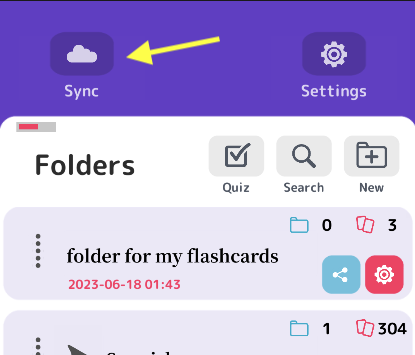
Open Sync
In folder view, tap the Sync button in the top-left corner. Log in if you aren't already.
同期画面を開く
フォルダ画面の左上にある「同期」ボタンをタップします。ログインしていない場合は、先にログインしてください。
-
2
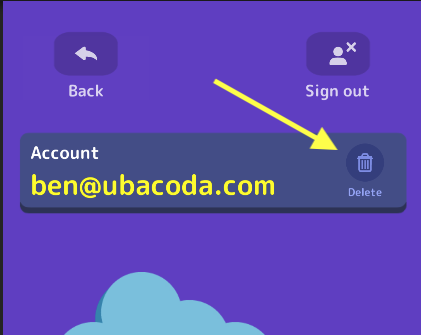
Tap the delete icon
Tap the Delete icon to the right of your account email address.
削除アイコンをタップ
アカウントのメールアドレスの右側にある削除アイコンをタップします。
-
3
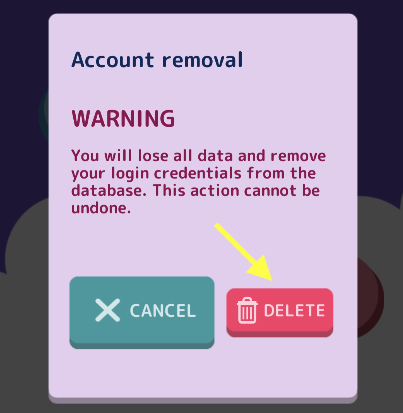
Confirm you want to continue
A prompt will appear. If you're sure, tap the red Delete button.
削除を確認する
確認メッセージが表示されます。削除してよろしければ、赤い削除ボタンをタップしてください。
-
4
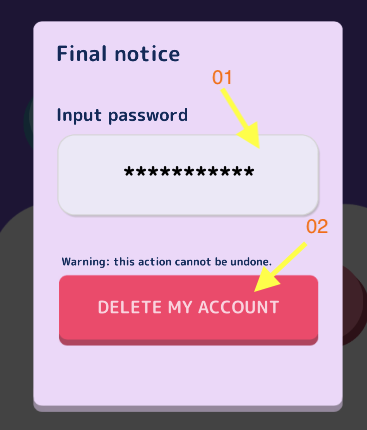
Enter your password
Type your account password (01), then tap the red Delete my Account button (02).
パスワードを入力
アカウントのパスワードを入力し(01)、赤いアカウント削除ボタンをタップします(02)。
All done
If your password was correct, you'll see a message confirming your account has been removed.
Have a question or need a hand?
Contact support